Two minutes. No Terminal.
Quota installs like any Mac app: open the disk image, drag it to Applications. Because Quota is not notarized by Apple, the very first launch adds one extra step. Here it is for each macOS version.
1 · Install
- Open the Quota disk image from your download.
- Drag Quota onto the Applications folder in that window, then eject the disk image.
- Open Quota from Applications or Spotlight.
2 · The first-launch dialog
macOS shows this for every app that is not in Apple's notarization program. It is not a verdict on Quota - Apple has not looked at it either way.
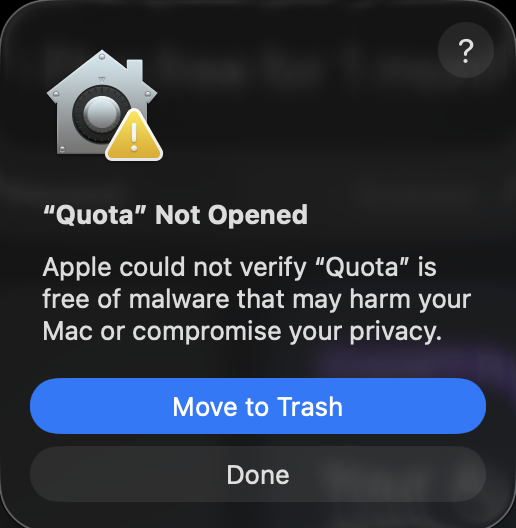
Click Done. Not "Move to Trash".
3 · Open Anyway
macOS 15 Sequoia and macOS 26:
- Open System Settings → Privacy & Security.
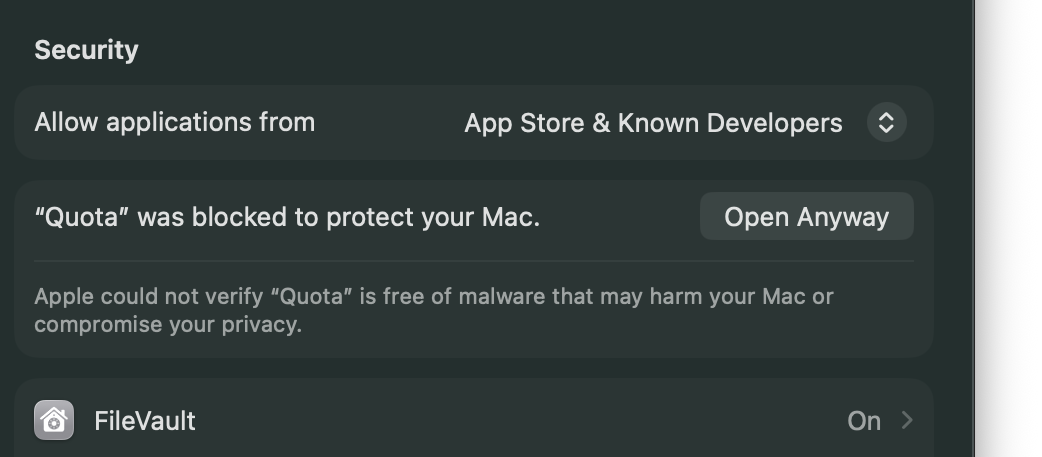
- Scroll to the Security section. You will see "Quota" was blocked to protect your Mac.
- Click Open Anyway, enter your password, click Open.
macOS 14 Sonoma: right-click (or Control-click) Quota in Applications, choose Open, then Open again in the dialog.
4 · Sign in
Quota opens its welcome window. Click Sign in with Claude, press Authorize in your browser, and the rings appear bottom-right within a minute. Right-click the widget for Settings.
Why isn't Quota notarized?
Notarization requires an Apple Developer account. I have not been able to open one from where I live - Apple ties the enrollment payment to the account's home country, and mine no longer match. It is a paperwork problem, not a security one. Quota's code is signed, updates are cryptographically verified, and nothing leaves your Mac except the one request to Anthropic's own usage endpoint. If notarization becomes possible, it arrives as a regular update and this page becomes shorter.
Stuck? support@quotawidget.com - a human answers.